Windows Crash Dump analysis is a fairly expansive topic that ranges from simple post mortem analysis of small memory dump files to remote debugging of a live system and probing the failure as it occurs in the operating system. This series of posts will cover analysis and troubleshooting of many common failures faced by end users on Windows XP, Windows Server 2003, Windows Vista, Windows Server 2008, Windows 7, Windows Server 2008 R2, and Windows 8. This specific post examines memory dumps, how to install/use the tools to analyze them, crashes that appear when KeBugCheckEx is called, and initial steps with most dumps. The blue screen of death in Windows 7 and earlier versions of Windows: “A problem has been detected and Windows has been shut down to prevent damage to your computer.” The blue screen of death in Windows 8 Developer Preview: “Your PC ran into a problem that it couldn’t handle, and now it needs to restart. You can search for the error online: %s.”
Why Does Windows Crash?#
Pundits and comedians aside, Windows crashes to help protect the system from suffering further corruption after a major error occurs with kernel mode code (often device drivers). Bug checks, Blue Screens of Death (BSOD), bugcheck, and stop errors are all words used to describe the same class of unhandled exception that occurs in kernel mode execution and causes the system to shut down (and possibly reboot). The source of the issue can be anything from a power fluctuation in the system to a damaged component or a software/hardware bug. The world is full of good programmers that make errors, and bad programmers that never really get it right. With all of the finger pointing that happens, sometimes it’s Microsoft, and sometimes it is the independent hardware or software vendor.
How To Collect a Kernel-Mode Crash Dump?#
Most modern desktop installations of Windows are configured to collect small memory dumps automatically. Some earlier versions of Windows server create complete dumps by default, and modern server operating systems dump the kernel memory on crash. This is generally configured in the advanced system settings. The easiest way to access these is to click Start, Right Click “Computer”, select properties and navigate to the Startup and Recovery settings on the advanced tab.  Small memory dumps are often sufficient for most post-mortem analysis, but occasionally vendors are interested in kernel memory dumps or full memory dumps where they can use their own debugging symbols to try to identify the source of the problem. Typically vendors do not publish debugging symbols, so the result of most debugging activity on small memory dumps is focused on identifying the misbehaving driver, device, or BIOS to make a change that will alleviate the issue. By default memory dumps are stored in the following locations and page file requirements (see KB254649).
| Memory Dump Type | Default Location (variable) | Default Location (typical) | Paging File Requirements |
| Small memory dump | %systemroot%Minidump | c:WindowsMinidump | >2 MB |
| Kernel memory dump | %systemroot%Memory.dmp | c:WindowsMemory.dmp | Large enough for kernel memory |
| Complete memory dump | %systemroot%Memory.dmp | c:WindowsMemory.dmp | All physical RAM + 1 MB |
Once you have the dump, the question becomes what to do with it. This is where the Debugging Tools for Windows come in handy…
Get the Tools… For Windows 7 and Before#
Older versions of the Debugging Tools for Windows were included as standalone installers, but modern versions are included with the Windows SDK. Currently the SDK comes as an ISO image and a web based installer. Installation is fairly straightforward. The only part of the SDK that is needed is the actual Debugging Tools for Windows (pictured in the screenshot below). The debuggers included are robust in that 32/64 bit hosts/targets are not important, meaning that a 32 bit host can debug a 64 bit target and vice versa. 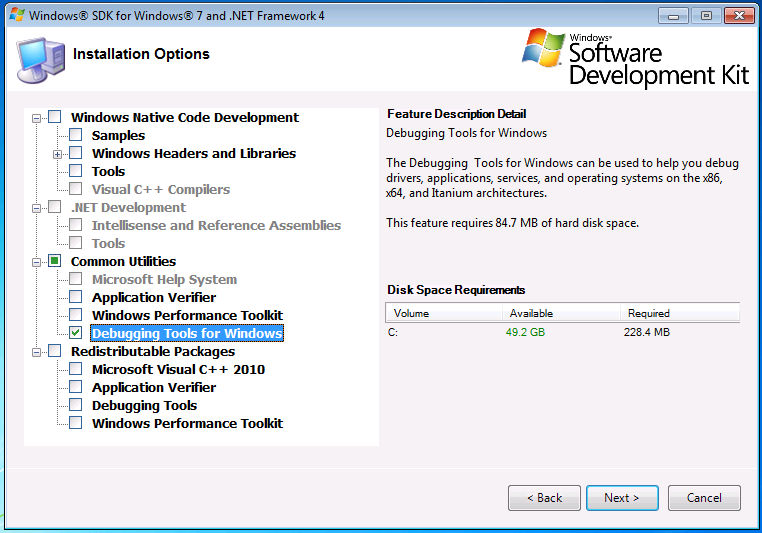 After installation, the symbols path needs to be set to ensure that there are enough symbols for the debugger to determine what actually occurred and what was loaded. The entire symbol collection offered to the public can be downloaded and placed on a local drive, or an Internet location can be specified to pull the symbols on demand. My recommendation is to pull them from the Internet, since the correct version of the symbols will be downloaded on demand and will not become outdated by installation of hotfixes and service packs.
  The instructions on setting the symbol path can be found in KB311503. This can be summarized to creating a folder (in my case c:Symbols) and setting the environment variable: _NT_SYMBOL_PATH = srv*c:Symbols*http://msdl.microsoft.com/download/symbols After this step, debugging can begin.
Get the Tools… For Windows 8 and Server 2012#
Download the latest version of the Windows SDK from Microsoft and launch the installer. Complete the first few screens until you reach the feature selection page of the wizard. All that is needed is the “Debugging Tools for Windows”
Launch WinDbg and Load Memory Dump#
Launch WinDbg from the start menu. 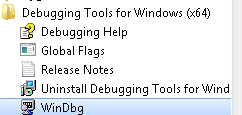 or Select file -> Open crash dump and select the appropriate .dmp file.
  From here, the typical starting point is to use the !analyze -v debugger command and look at the error that generated the crash dump.
  Further troubleshooting is dependent on the specific error. Some errors may require the driver verifier to be enabled to determine a root cause.
Possible Errors#
The following are a list of “standard” bug codes in Windows and links to posts that describe error-specific debugging techniques. This list is available on MSDN and in the built-in debugger help file (Debugging Tools for WindowsDebugging TechniquesBug Checks (Blue Screens)Bug Check Code Reference). I will update links as I make more posts showing live examples. 0x1: APC_INDEX_MISMATCH 0x2: DEVICE_QUEUE_NOT_BUSY 0x3: INVALID_AFFINITY_SET 0x4: INVALID_DATA_ACCESS_TRAP 0x5: INVALID_PROCESS_ATTACH_ATTEMPT 0x6: INVALID_PROCESS_DETACH_ATTEMPT 0x7: INVALID_SOFTWARE_INTERRUPT 0x8: IRQL_NOT_DISPATCH_LEVEL 0x9: IRQL_NOT_GREATER_OR_EQUAL 0xA: IRQL_NOT_LESS_OR_EQUAL 0xB: NO_EXCEPTION_HANDLING_SUPPORT 0xC: MAXIMUM_WAIT_OBJECTS_EXCEEDED 0xD: MUTEX_LEVEL_NUMBER_VIOLATION 0xE: NO_USER_MODE_CONTEXT 0xF: SPIN_LOCK_ALREADY_OWNED 0x10: SPIN_LOCK_NOT_OWNED 0x11: THREAD_NOT_MUTEX_OWNER 0x12: TRAP_CAUSE_UNKNOWN 0x13: EMPTY_THREAD_REAPER_LIST 0x14: CREATE_DELETE_LOCK_NOT_LOCKED 0x15: LAST_CHANCE_CALLED_FROM_KMODE 0x16: CID_HANDLE_CREATION 0x17: CID_HANDLE_DELETION 0x18: REFERENCE_BY_POINTER 0x19: BAD_POOL_HEADER 0x1A: MEMORY_MANAGEMENT 0x1B: PFN_SHARE_COUNT 0x1C: PFN_REFERENCE_COUNT 0x1D: NO_SPIN_LOCK_AVAILABLE 0x1E: KMODE_EXCEPTION_NOT_HANDLED 0x1F: SHARED_RESOURCE_CONV_ERROR 0x20: KERNEL_APC_PENDING_DURING_EXIT 0x21: QUOTA_UNDERFLOW 0x22: FILE_SYSTEM 0x23: FAT_FILE_SYSTEM 0x24: NTFS_FILE_SYSTEM 0x25: NPFS_FILE_SYSTEM 0x26: CDFS_FILE_SYSTEM 0x27: RDR_FILE_SYSTEM 0x28: CORRUPT_ACCESS_TOKEN 0x29: SECURITY_SYSTEM 0x2A: INCONSISTENT_IRP 0x2B: PANIC_STACK_SWITCH 0x2C: PORT_DRIVER_INTERNAL 0x2D: SCSI_DISK_DRIVER_INTERNAL 0x2E: DATA_BUS_ERROR 0x2F: INSTRUCTION_BUS_ERROR 0x30: SET_OF_INVALID_CONTEXT 0x31: PHASE0_INITIALIZATION_FAILED 0x32: PHASE1_INITIALIZATION_FAILED 0x33: UNEXPECTED_INITIALIZATION_CALL 0x34: CACHE_MANAGER 0x35: NO_MORE_IRP_STACK_LOCATIONS 0x36: DEVICE_REFERENCE_COUNT_NOT_ZERO 0x37: FLOPPY_INTERNAL_ERROR 0x38: SERIAL_DRIVER_INTERNAL 0x39: SYSTEM_EXIT_OWNED_MUTEX 0x3A: SYSTEM_UNWIND_PREVIOUS_USER 0x3B: SYSTEM_SERVICE_EXCEPTION 0x3C: INTERRUPT_UNWIND_ATTEMPTED 0x3D: INTERRUPT_EXCEPTION_NOT_HANDLED 0x3E: MULTIPROCESSOR_CONFIGURATION_NOT_SUPPORTED 0x3F: NO_MORE_SYSTEM_PTES 0x40: TARGET_MDL_TOO_SMALL 0x41: MUST_SUCCEED_POOL_EMPTY 0x42: ATDISK_DRIVER_INTERNAL 0x43: NO_SUCH_PARTITION 0x44: MULTIPLE_IRP_COMPLETE_REQUESTS 0x45: INSUFFICIENT_SYSTEM_MAP_REGS 0x46: DEREF_UNKNOWN_LOGON_SESSION 0x47: REF_UNKNOWN_LOGON_SESSION 0x48: CANCEL_STATE_IN_COMPLETED_IRP 0x49: PAGE_FAULT_WITH_INTERRUPTS_OFF 0x4A: IRQL_GT_ZERO_AT_SYSTEM_SERVICE 0x4B: STREAMS_INTERNAL_ERROR 0x4C: FATAL_UNHANDLED_HARD_ERROR 0x4D: NO_PAGES_AVAILABLE 0x4E: PFN_LIST_CORRUPT 0x4F: NDIS_INTERNAL_ERROR 0x50: PAGE_FAULT_IN_NONPAGED_AREA 0x51: REGISTRY_ERROR 0x52: MAILSLOT_FILE_SYSTEM 0x53: NO_BOOT_DEVICE 0x54: LM_SERVER_INTERNAL_ERROR 0x55: DATA_COHERENCY_EXCEPTION 0x56: INSTRUCTION_COHERENCY_EXCEPTION 0x57: XNS_INTERNAL_ERROR 0x58: FTDISK_INTERNAL_ERROR 0x59: PINBALL_FILE_SYSTEM 0x5A: CRITICAL_SERVICE_FAILED 0x5B: SET_ENV_VAR_FAILED 0x5C: HAL_INITIALIZATION_FAILED 0x5D: UNSUPPORTED_PROCESSOR 0x5E: OBJECT_INITIALIZATION_FAILED 0x5F: SECURITY_INITIALIZATION_FAILED 0x60: PROCESS_INITIALIZATION_FAILED 0x61: HAL1_INITIALIZATION_FAILED 0x62: OBJECT1_INITIALIZATION_FAILED 0x63: SECURITY1_INITIALIZATION_FAILED 0x64: SYMBOLIC_INITIALIZATION_FAILED 0x65: MEMORY1_INITIALIZATION_FAILED 0x66: CACHE_INITIALIZATION_FAILED 0x67: CONFIG_INITIALIZATION_FAILED 0x68: FILE_INITIALIZATION_FAILED 0x69: IO1_INITIALIZATION_FAILED 0x6A: LPC_INITIALIZATION_FAILED 0x6B: PROCESS1_INITIALIZATION_FAILED 0x6C: REFMON_INITIALIZATION_FAILED 0x6D: SESSION1_INITIALIZATION_FAILED 0x6E: SESSION2_INITIALIZATION_FAILED 0x6F: SESSION3_INITIALIZATION_FAILED 0x70: SESSION4_INITIALIZATION_FAILED 0x71: SESSION5_INITIALIZATION_FAILED 0x72: ASSIGN_DRIVE_LETTERS_FAILED 0x73: CONFIG_LIST_FAILED 0x74: BAD_SYSTEM_CONFIG_INFO 0x75: CANNOT_WRITE_CONFIGURATION 0x76: PROCESS_HAS_LOCKED_PAGES 0x77: KERNEL_STACK_INPAGE_ERROR 0x78: PHASE0_EXCEPTION 0x79: MISMATCHED_HAL 0x7A: KERNEL_DATA_INPAGE_ERROR 0x7B: INACCESSIBLE_BOOT_DEVICE 0x7C: BUGCODE_NDIS_DRIVER 0x7D: INSTALL_MORE_MEMORY 0x7E: SYSTEM_THREAD_EXCEPTION_NOT_HANDLED 0x7F: UNEXPECTED_KERNEL_MODE_TRAP 0x80: NMI_HARDWARE_FAILURE 0x81: SPIN_LOCK_INIT_FAILURE 0x82: DFS_FILE_SYSTEM 0x85: SETUP_FAILURE 0x8B: MBR_CHECKSUM_MISMATCH 0x8E: KERNEL_MODE_EXCEPTION_NOT_HANDLED 0x8F: PP0_INITIALIZATION_FAILED 0x90: PP1_INITIALIZATION_FAILED 0x92: UP_DRIVER_ON_MP_SYSTEM 0x93: INVALID_KERNEL_HANDLE 0x94: KERNEL_STACK_LOCKED_AT_EXIT 0x96: INVALID_WORK_QUEUE_ITEM 0x97: BOUND_IMAGE_UNSUPPORTED 0x98: END_OF_NT_EVALUATION_PERIOD 0x99: INVALID_REGION_OR_SEGMENT 0x9A: SYSTEM_LICENSE_VIOLATION 0x9B: UDFS_FILE_SYSTEM 0x9C: MACHINE_CHECK_EXCEPTION 0x9E: USER_MODE_HEALTH_MONITOR 0x9F: DRIVER_POWER_STATE_FAILURE 0xA0: INTERNAL_POWER_ERROR 0xA1: PCI_BUS_DRIVER_INTERNAL 0xA2: MEMORY_IMAGE_CORRUPT 0xA3: ACPI_DRIVER_INTERNAL 0xA4: CNSS_FILE_SYSTEM_FILTER 0xA5: ACPI_BIOS_ERROR 0xA7: BAD_EXHANDLE 0xAB: SESSION_HAS_VALID_POOL_ON_EXIT 0xAC: HAL_MEMORY_ALLOCATION 0xAD: VIDEO_DRIVER_DEBUG_REPORT_REQUEST 0xB4: VIDEO_DRIVER_INIT_FAILURE 0xB8: ATTEMPTED_SWITCH_FROM_DPC 0xB9: CHIPSET_DETECTED_ERROR 0xBA: SESSION_HAS_VALID_VIEWS_ON_EXIT 0xBB: NETWORK_BOOT_INITIALIZATION_FAILED 0xBC: NETWORK_BOOT_DUPLICATE_ADDRESS 0xBE: ATTEMPTED_WRITE_TO_READONLY_MEMORY 0xBF: MUTEX_ALREADY_OWNED 0xC1: SPECIAL_POOL_DETECTED_MEMORY_CORRUPTION 0xC2: BAD_POOL_CALLER 0xC4: DRIVER_VERIFIER_DETECTED_VIOLATION 0xC5: DRIVER_CORRUPTED_EXPOOL 0xC6: DRIVER_CAUGHT_MODIFYING_FREED_POOL 0xC7: TIMER_OR_DPC_INVALID 0xC8: IRQL_UNEXPECTED_VALUE 0xC9: DRIVER_VERIFIER_IOMANAGER_VIOLATION 0xCA: PNP_DETECTED_FATAL_ERROR 0xCB: DRIVER_LEFT_LOCKED_PAGES_IN_PROCESS 0xCC: PAGE_FAULT_IN_FREED_SPECIAL_POOL 0xCD: PAGE_FAULT_BEYOND_END_OF_ALLOCATION 0xCE: DRIVER_UNLOADED_WITHOUT_CANCELLING_PENDING_OPERATIONS 0xCF: TERMINAL_SERVER_DRIVER_MADE_INCORRECT_MEMORY_REFERENCE 0xD0: DRIVER_CORRUPTED_MMPOOL 0xD1: DRIVER_IRQL_NOT_LESS_OR_EQUAL 0xD2: BUGCODE_ID_DRIVER 0xD3: DRIVER_PORTION_MUST_BE_NONPAGED 0xD4: SYSTEM_SCAN_AT_RAISED_IRQL_CAUGHT_IMPROPER_DRIVER_UNLOAD 0xD5: DRIVER_PAGE_FAULT_IN_FREED_SPECIAL_POOL 0xD6: DRIVER_PAGE_FAULT_BEYOND_END_OF_ALLOCATION 0xD7: DRIVER_UNMAPPING_INVALID_VIEW 0xD8: DRIVER_USED_EXCESSIVE_PTES 0xD9: LOCKED_PAGES_TRACKER_CORRUPTION 0xDA: SYSTEM_PTE_MISUSE 0xDB: DRIVER_CORRUPTED_SYSPTES 0xDC: DRIVER_INVALID_STACK_ACCESS 0xDE: POOL_CORRUPTION_IN_FILE_AREA 0xDF: IMPERSONATING_WORKER_THREAD 0xE0: ACPI_BIOS_FATAL_ERROR 0xE1: WORKER_THREAD_RETURNED_AT_BAD_IRQL 0xE2: MANUALLY_INITIATED_CRASH 0xE3: RESOURCE_NOT_OWNED 0xE4: WORKER_INVALID 0xE6: DRIVER_VERIFIER_DMA_VIOLATION 0xE7: INVALID_FLOATING_POINT_STATE 0xE8: INVALID_CANCEL_OF_FILE_OPEN 0xE9: ACTIVE_EX_WORKER_THREAD_TERMINATION 0xEA: THREAD_STUCK_IN_DEVICE_DRIVER 0xEB: DIRTY_MAPPED_PAGES_CONGESTION 0xEC: SESSION_HAS_VALID_SPECIAL_POOL_ON_EXIT 0xED: UNMOUNTABLE_BOOT_VOLUME 0xEF: CRITICAL_PROCESS_DIED 0xF1: SCSI_VERIFIER_DETECTED_VIOLATION 0xF3: DISORDERLY_SHUTDOWN 0xF4: CRITICAL_OBJECT_TERMINATION 0xF5: FLTMGR_FILE_SYSTEM 0xF6: PCI_VERIFIER_DETECTED_VIOLATION 0xF7: DRIVER_OVERRAN_STACK_BUFFER 0xF8: RAMDISK_BOOT_INITIALIZATION_FAILED 0xF9: DRIVER_RETURNED_STATUS_REPARSE_FOR_VOLUME_OPEN 0xFA: HTTP_DRIVER_CORRUPTED 0xFC: ATTEMPTED_EXECUTE_OF_NOEXECUTE_MEMORY 0xFD: DIRTY_NOWRITE_PAGES_CONGESTION 0xFE: BUGCODE_USB_DRIVER 0xFF: RESERVE_QUEUE_OVERFLOW 0x100: LOADER_BLOCK_MISMATCH 0x101: CLOCK_WATCHDOG_TIMEOUT 0x103: MUP_FILE_SYSTEM 0x104: AGP_INVALID_ACCESS 0x105: AGP_GART_CORRUPTION 0x106: AGP_ILLEGALLY_REPROGRAMMED 0x108: THIRD_PARTY_FILE_SYSTEM_FAILURE 0x109: CRITICAL_STRUCTURE_CORRUPTION 0x10A: APP_TAGGING_INITIALIZATION_FAILED 0x10C: FSRTL_EXTRA_CREATE_PARAMETER_VIOLATION 0x10D: WDF_VIOLATION 0x10E: VIDEO_MEMORY_MANAGEMENT_INTERNAL 0x10F: RESOURCE_MANAGER_EXCEPTION_NOT_HANDLED 0x111: RECURSIVE_NMI 0x112: MSRPC_STATE_VIOLATION 0x113: VIDEO_DXGKRNL_FATAL_ERROR 0x114: VIDEO_SHADOW_DRIVER_FATAL_ERROR 0x115: AGP_INTERNAL 0x116: VIDEO_TDR_ERROR 0x117: VIDEO_TDR_TIMEOUT_DETECTED 0x119: VIDEO_SCHEDULER_INTERNAL_ERROR 0x11A: EM_INITIALIZATION_FAILURE 0x11B: DRIVER_RETURNED_HOLDING_CANCEL_LOCK 0x11C: ATTEMPTED_WRITE_TO_CM_PROTECTED_STORAGE 0x11D: EVENT_TRACING_FATAL_ERROR 0x121: DRIVER_VIOLATION 0x122: WHEA_INTERNAL_ERROR 0x124: WHEA_UNCORRECTABLE_ERROR 0x127: PAGE_NOT_ZERO 0x12B: FAULTY_HARDWARE_CORRUPTED_PAGE 0x12C: EXFAT_FILE_SYSTEM 0x144: BUGCODE_USB3_DRIVER 0x1000007E: SYSTEM_THREAD_EXCEPTION_NOT_HANDLED_M 0x1000007F: UNEXPECTED_KERNEL_MODE_TRAP_M 0x1000008E: KERNEL_MODE_EXCEPTION_NOT_HANDLED_M 0x100000EA: THREAD_STUCK_IN_DEVICE_DRIVER_M 0xC0000135 STATUS_DLL_NOT_FOUND 0xC0000218: STATUS_CANNOT_LOAD_REGISTRY_FILE 0xC000021A: STATUS_SYSTEM_PROCESS_TERMINATED 0xC0000221: STATUS_IMAGE_CHECKSUM_MISMATCH 0xDEADDEAD: MANUALLY_INITIATED_CRASH Source: Mike’s Technology and Finance Blog
comments